Set up Trump Accounts
Trump Accounts can be set up in Payroll Relief for employee and employer contributions. Contributions can begin after July 4th, 2026.
Payroll Relief automatically caps contributions at a combined $5,000 for each child. Employer contributions are additionally capped at $2,500 for each employee. This can be split across multiple child accounts.
Before setting up a Trump Account
Before a Trump Account is set up in Payroll Relief, the employee must open the account for their child using the 4547: Trump Account Election(s) form. To find the form in Payroll Relief, go to Resources, then select Forms and Pubs.
Create TRUMP Account deductions
Instructions for setting up Trump Accounts are also displayed in Payroll Relief when selecting one of the TRUMP Account options from Type when setting up Deductions.
If both the employee and the employer are contributing, an employee and employer deduction must both be set up for the same child account.
- Go to Employer Setup, then select Deductions.
-
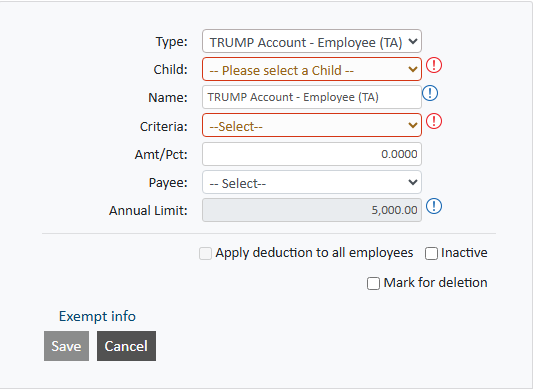
Add a new deduction. Select either the employee or employer account Type:
- To set up the employee contribution, select TRUMP Account - Employee (TA).
- To set up the employer contribution, select TRUMP Account - Employer (TA)
-
Select the Child.
Up to five deductions can be created to support Trump accounts for each child assigned to each employee.
-
Enter a Name for the contribution.
We recommend using the following Name formats:
- For employee contributions — Trump Account – Child followed by the numbers 1 to 5, for example Trump Account – Child 1.
- For employee contributions — Trump Account – Employer followed by the number 1 to 5 as they relate to the child account, for example Trump Account – Employer 1.
- Select a Criteria option.
- Save the details.
- The deduction then needs to be assigned to employees and contractors. Go to Employees, then select Deductions.
-
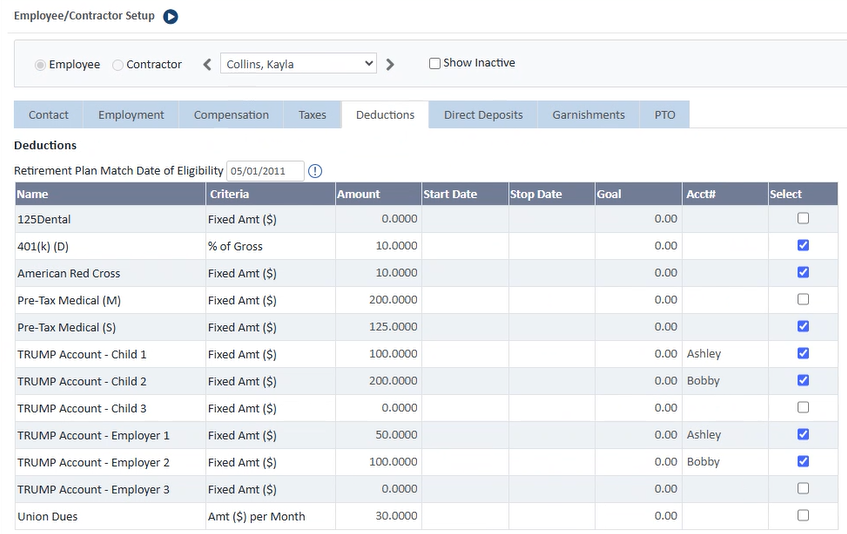
For the TRUMP Account rows, enter the following details matching the child deduction with the employer contribution where applicable (for example, Child 1 with Employer 1):
If the employer is contributing but the employee is not, the employee deduction must still be active and set to an amount of 0.0000.
- Amount
- Start Date and Stop Date (if applicable)
- Goal (if applicable)
- Acct# — if the account number is not yet known, enter the child's name.
- To activate the deduction, employer contribution or both, select the Select option for that row.
- Select Save.